d21b71365d2bf0fab6…The English page renders the captured source as Markdown and preserves its images and links. Copyright remains with the official publisher.
Apple Creator Studio gets smarter, faster, and more connected
Evidence tier: A1 Evidence type: Auto-discovered official publication Source: Apple Newsroom Official publication date: 2026-06-30 Captured: 2026-07-16T20:28:26.408Z
opens in new window
UPDATE June 30, 2026
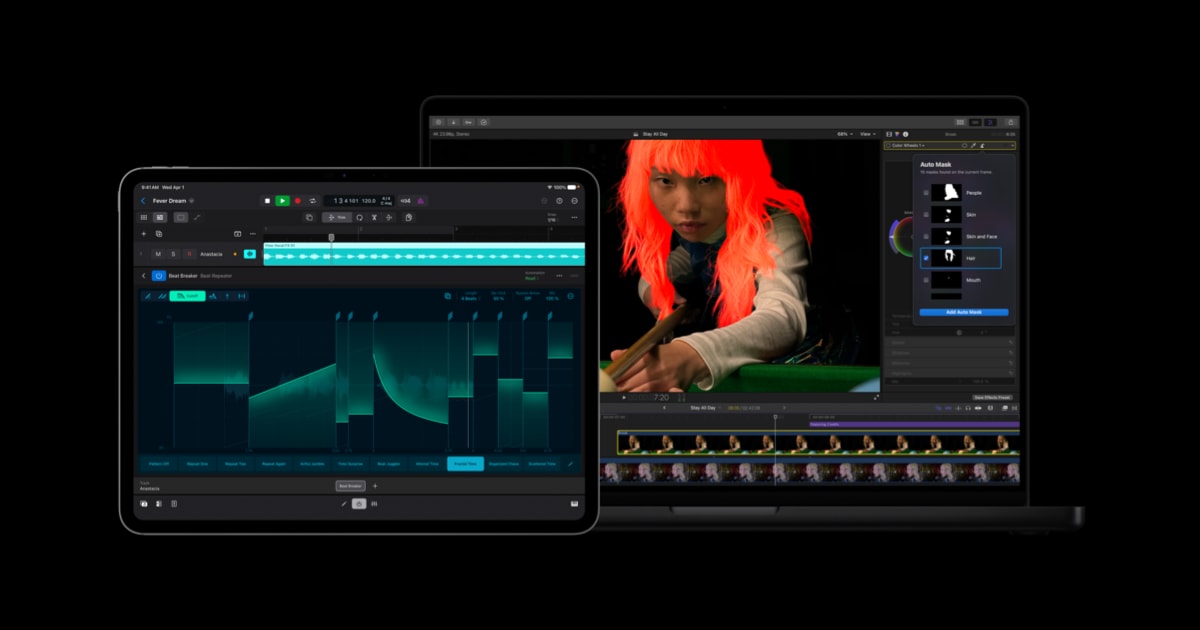
Mac users can take advantage of Auto Mask, a new way to isolate and refine specific elements of footage. On-device AI recognizes subjects like skin, hair, sky, foliage, and clothing, with no manual tracking needed. A simple hover over a clip brings up a live preview of what has been detected, or users can choose from the list in the inspector, making it seamless to pair the mask with any color correction or effect for precise adjustments. Auto Mask works hand in hand with Magnetic Mask, which gives editors complete control over exactly what to identify, track, and mask. Also on Mac, a reimagined Match Color produces more accurate and natural color matches across a wider range of footage and lighting conditions. Editors select a reference frame and Final Cut Pro analyzes shots to bring them into perfect harmony, with the option to refine as needed. And Advanced Trimming allows users to fine-tune incoming and outgoing frames one at a time.
Powerful New Image Editing and Graphics Tools
In Pixelmator Pro, Keynote, Pages, and Numbers, it’s now easy to generate vector shapes to fit any project. Users can refine their shapes as desired, and shapes are saved to a dedicated collection for use at a later time. Advanced image generation and the Content Hub also expand to Pixelmator Pro.8 With image generation, users can create and edit images using natural language, and in the Content Hub, they can browse a curated collection of premium photos, graphics, shapes, and illustrations to inspire new designs.
Keynote, Pages, and Numbers are also adding some highly requested features for all users: Keynote gains stunning new transitions and builds, Pages on iPhone and iPad adds Auto-Hyphenate and Show Invisibles for more precise editing, and Numbers makes navigating complex spreadsheets faster than ever with the ability to hide or color-code individual sheets. And with iOS 27, iPadOS 27, and macOS 27, Freeform will also add the ability to generate shapes9 and open an image in Pixelmator Pro, in addition to introducing Dark Mode, folders to organize boards, and support for drawing on Mac.
Taking Music Creation Further
-
Apple Creator Studio updates are available today for existing subscribers as a free update, and for new subscribers, $12.99 (U.S.) per month or $129 (U.S.) per year. All new subscribers will enjoy a one-month free trial of Apple Creator Studio, and with the purchase of a new Mac or qualifying iPad,13 customers can receive three months of Apple Creator Studio for free.14
-
Education savings are available for college students and educators for $2.99 (U.S.) per month or $29.99 (U.S.) per year.15
-
Apple Creator Studio is available to download on the App Store as a universal purchase.
-
Up to six family members can share all of the apps and content included in Apple Creator Studio with Family Sharing.
-
One-time-purchase versions of Final Cut Pro ($299.99 U.S.), Logic Pro ($199.99 U.S.), Pixelmator Pro ($49.99 U.S.), Motion ($49.99 U.S.), Compressor ($49.99 U.S.), and MainStage ($29.99 U.S.) are available on the Mac App Store.16
-
Free versions of Keynote, Pages, Numbers, and Freeform continue to be available and are included with every new iPhone, Mac, and iPad.
-
Text of this article
-
Media in this article
- The Apple Creator Studio version of Final Cut Pro on Mac requires macOS 15.6 or later. Some features require Apple silicon. Final Cut Pro for iPad requires iPadOS 18.6 or later and an iPad, iPad Pro, or iPad Air with an Apple M1 chip or later, iPad (A16), or iPad mini (A17 Pro).
- Generate Captions in Final Cut Pro requires a Mac with Apple silicon and macOS 15.6 or later; or an iPad with the Apple M1 chip or later, iPad (A16), or iPad mini (A17 Pro) and iPadOS 26 or later. Available only in U.S. English.
- Motion requires macOS 15.6 or later.
- Compressor requires macOS 15.6 or later. Some features require a Mac with Apple silicon.
- Final Cut Camera requires an iPhone with iOS 18.6 or later, or an iPad with iPadOS 18.6 or later. Expanded ProRes support requires iPhone 13 Pro or later, and Clean HDMI Out requires iPhone 17 Pro.
- The Apple Creator Studio version of Pixelmator Pro requires macOS 26 or later. Pixelmator Pro for iPad requires iPadOS 26 or later and an iPad, iPad Pro, or iPad Air with an Apple M1 chip or later; iPad (A16); or iPad mini (A17 Pro).
- The Apple Creator Studio version of Keynote, Pages, and Numbers requires iOS 18 or later, iPadOS 18 or later, or macOS Sequoia 15.6 or later. Some intelligent features require iOS 26, iPadOS 26, or macOS Tahoe.
- Image Generation and Shape Generation require iPhone 15 Pro or iPhone 15 Pro Max or later running iOS 26 or later; an iPad with an A17 Pro chip, or an iPad Pro or iPad Air with an M1 chip or later, running iPadOS 26 or later; or a Mac with Apple silicon running macOS 26 or later and an Apple Account with iCloud enabled. Some artificial intelligence features of Apple Creator Studio utilize third-party models and may have usage limits and restrictions. Image Generation and Shape Generation in Pixelmator Pro require an Apple Intelligence-capable device. For a list of Apple Intelligence availability and technical requirements, see support.apple.com/121115 for more information.
- New updates to Freeform will be available to current subscribers as a free software update with a compatible iPhone, iPad, or Mac running iOS 27, iPadOS 27, or macOS 27.
- Logic Pro for Mac requires macOS 15.6 or later and a Mac with Apple silicon. Logic Pro for iPad requires iPadOS 26 or later and an iPad with Apple A12 Bionic chip or later. Some features require Apple A17 Pro chip or later.
- Session Players require iPad with the Apple M1 chip or later, or a Mac with Apple silicon.
- MainStage requires macOS 15.6 or later and a Mac with Apple silicon.
- A new Mac or iPad purchased from Apple or an Apple Authorized Reseller. iPad must have at least 6 GB memory and an A16, A17 Pro, or M-series chip or later.
- New and qualified returning subscribers only. Plan renews at $12.99 per month or $129 per year based on plan selected. Only one offer per Apple Account and only one offer per family if they’re part of a Family Sharing group, regardless of the number of devices that they or their family purchase. This offer is not available if the account holder or their family have previously accepted an Apple Creator Studio subscription three-months-free offer. Offer good for three months after eligible device activation. Plan automatically renews until cancelled. Restrictions and other terms apply.
- New subscribers only. Education Savings Plan automatically renews at $2.99 per month or $29.99 per year based on plan selected until cancelled. Offer good for college students and educators only and does not extend to a Family Sharing group. Verification required. Terms apply. Limited-time offer; offer may end at any time.
- The one-time-purchase versions of Final Cut Pro require macOS 15.6 or later, Logic Pro requires macOS 15.6 or later, and Pixelmator Pro requires macOS 12 or later. MainStage is available for any Mac supported by macOS 15.6 or later. Motion requires macOS 15.6 or later. Compressor requires macOS 15.6 or later and some features require a Mac with Apple silicon.
 Fireblocks